Using the Infoscience REST API
The Infoscience REST API provides programmatic access to all metadata and public files in the repository. It is the backbone of the Infoscience platform itself and can be used to build integrations, automate workflows, and harvest data.
Base URL: https://infoscience.epfl.ch/server/api
URL convention in examples
All curl examples on this page use paths relative to the base URL above. To run them directly, prepend the base URL:
curl "https://infoscience.epfl.ch/server/api/core/items/{{uuid}}" ...
Interactive explorer
The HAL Browser provides a live, self-documenting interface to all available endpoints. Use it to explore the API structure and test requests without writing code.
Reverse-engineer the interface
Everything possible through the Infoscience web interface is also possible via the API. Open your browser's developer tools (F12 → Network tab), perform any action in the UI, and inspect the requests fired — this reveals the exact API calls and parameters behind each feature.
Official specifications
- DSpace core: github.com/DSpace/RestContract
- DSpace-CRIS extensions: github.com/4Science/Rest7Contract
Architecture
The API follows three complementary standards:
- HAL — every response embeds
_linksthat describe available operations and related resources. - HATEOAS — the API is self-navigable: start from the root and follow links rather than constructing URLs manually.
- ALPS — machine-readable semantic profiles document what each endpoint accepts and returns.
All responses are in JSON. The API is read-only for anonymous users; authenticated requests can also modify data with appropriate rights.
Authentication
Anonymous access
All publicly accessible metadata and files are available without a token:
curl "/core/items/{{uuid}}" \
  -H 'accept: application/json'
Bearer token
A personal token grants access to restricted resources and is required for write operations.
Obtain your token:
- Log in to infoscience.epfl.ch.
- Click your profile icon → Account and profile.
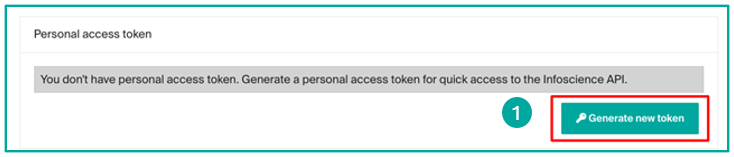
- Scroll down → Generate a new token.
- Copy the token immediately — it will not be shown again.
Warning
Once generated, the token is not recoverable. If lost, generate a new one — the previous one is automatically revoked.
export INFOSCIENCE_TOKEN="your_token_here"

curl "/core/items/{{uuid}}" \
  -H 'accept: application/json' \
  -H "Authorization: Bearer $INFOSCIENCE_TOKEN"
Service accounts
For automated workflows not tied to an individual account, contact infoscience@epfl.ch to request a service account. In specific justified cases, write access can be granted.
Security best practices
- Never include your token in source code or public repositories.
- Store tokens in environment variables or a secrets manager (
.envfile, CI secrets). - Rotate your token if you suspect it has been compromised.
Core concepts
Pagination
All collection endpoints are paginated. The response includes page.totalElements and page.totalPages for navigation:
| Parameter | Default | Max | Description |
|---|---|---|---|
page |
0 |
— | Zero-indexed page number |
size |
20 |
100 |
Results per page |
# Page 3, 50 results per page
curl "/discover/search/objects\
?configuration=researchoutputs&query=dc.description.sponsorship:LASUR\
&page=2&size=50" \
  -H "Authorization: Bearer $INFOSCIENCE_TOKEN"
The simplest way to iterate all pages is to follow _links.next in each response — it is present as long as more pages exist, and absent on the last page:
import requests, os

BASE    = "https://infoscience.epfl.ch/server/api"
HEADERS = {
    "accept": "application/json",
    "Authorization": f"Bearer {os.environ['INFOSCIENCE_TOKEN']}",
}

def search_all_raw(query, configuration="researchoutputs", size=100):
    """Iterate all pages via _links.next and return raw indexableObject dicts."""
    url = f"{BASE}/discover/search/objects"
    params = {
        "configuration": configuration,
        "query": query,
        "sort": "dc.date.issued,DESC",
        "size": size,
    }
    results = []
    while url:
        r = requests.get(url, headers=HEADERS, params=params)
        r.raise_for_status()
        data = r.json()
        params = None  # params are encoded in _links.next from the second page on

        search_result = data.get("_embedded", {}).get("searchResult", {})
        for obj in search_result.get("_embedded", {}).get("objects", []):
            item = obj.get("_embedded", {}).get("indexableObject")
            if item:
                results.append(item)

        url = (search_result.get("_links", {})
                            .get("next", {})
                            .get("href"))
    return results
Alternatively, iterate by page number using page.totalPages:
# BASE and HEADERS are defined in the _links.next variant above
def search_all_raw(query, configuration="researchoutputs", size=100):
    """Iterate all pages by page number and return raw indexableObject dicts."""
    page, results = 0, []
    while True:
        r = requests.get(
            f"{BASE}/discover/search/objects",
            headers=HEADERS,
            params={
                "configuration": configuration,
                "query": query,
                "sort": "dc.date.issued,DESC",
                "page": page,
                "size": size,
            }
        )
        r.raise_for_status()
        data = r.json()

        search_result = data.get("_embedded", {}).get("searchResult", {})
        for obj in search_result.get("_embedded", {}).get("objects", []):
            item = obj.get("_embedded", {}).get("indexableObject")
            if item:
                results.append(item)

        page_info = search_result.get("page", {})
        if page >= page_info.get("totalPages", 1) - 1:
            break
        page += 1
    return results
Embedding related resources
The embed parameter avoids extra round-trips by including related resources in one request. Combine multiple values as a comma-separated list:
| Value | Embeds |
|---|---|
bundles/bitstreams |
All bundles and their files (ORIGINAL, TEXT, THUMBNAIL…) |
thumbnail |
The primary thumbnail of the item |
metrics |
Citation and usage metrics (Scopus, views, downloads) |
# Files only
curl "/core/items/{{uuid}}\
?embed=bundles%2Fbitstreams" \
  -H "Authorization: Bearer $INFOSCIENCE_TOKEN"

# Thumbnail only
curl "/core/items/{{uuid}}\
?embed=thumbnail" \
  -H "Authorization: Bearer $INFOSCIENCE_TOKEN"

# Files + thumbnail + metrics in one request
curl "/core/items/{{uuid}}\
?embed=bundles%2Fbitstreams,thumbnail,metrics" \
  -H "Authorization: Bearer $INFOSCIENCE_TOKEN"
embed also works on the search endpoint — useful to retrieve files or metrics for all results in a single call:
curl "/discover/search/objects\
?configuration=researchoutputs&query=dc.description.sponsorship:LASUR\
&size=20&embed=bundles%2Fbitstreams,thumbnail,metrics" \
  -H "Authorization: Bearer $INFOSCIENCE_TOKEN"
Response structure
Search response
A search response wraps results in a nested _embedded object:
{
  "_embedded": {
    "searchResult": {
      "_embedded": {
        "objects": [
          {
            "_embedded": {
              "indexableObject": {
                "uuid": "a1b2c3d4-e5f6-7890-abcd-000000000001",
                "metadata": {
                  "dc.title": [{ "value": "My publication title", "language": null }],
                  "dc.date.issued": [{ "value": "2024", "language": null }],
                  "dc.contributor.author": [
                    { "value": "Martin, Sophie", "language": null },
                    { "value": "Dupont, Jean", "language": null }
                  ]
                },
                "_links": {
                  "self":            { "href": "/core/items/a1b2c3d4-..." },
                  "bundles":         { "href": "/core/items/a1b2c3d4-.../bundles" },
                  "owningCollection":{ "href": "/core/items/a1b2c3d4-.../owningCollection" }
                }
              }
            }
          }
        ]
      },
      "page": {
        "size": 20,
        "totalElements": 1234,
        "totalPages": 62,
        "number": 0
      }
    }
  }
}
Key fields:
| Field | Description |
|---|---|
_embedded.searchResult._embedded.objects |
Array of result wrappers; the actual item is at _embedded.indexableObject |
page.totalElements |
Total number of matching records |
page.totalPages |
Total number of pages at the requested size |
page.number |
Current page (zero-indexed) |
_links.next |
URL of the next page (absent on the last page) |
Item (direct GET)
A direct item request returns the object without the search wrapper. The example below is drawn from a real Infoscience record:
{
  "id":     "a1b2c3d4-e5f6-7890-abcd-000000000001",
  "uuid":   "a1b2c3d4-e5f6-7890-abcd-000000000001",
  "name":   "A novel numerical method for plasma simulation",
  "handle": "20.500.14299/000001",
  "metadata": {
    "dc.title": [
      { "value": "A novel numerical method for plasma simulation",
        "language": null, "authority": null, "confidence": -1, "place": 0 }
    ],
    "dc.date.issued": [
      { "value": "2024-10-01",
        "language": null, "authority": null, "confidence": -1, "place": 0 }
    ],
    "dc.contributor.author": [
      { "value": "Durand, Alice",
        "language": null, "authority": null, "confidence": -1, "place": 0 },
      { "value": "Martin, Thomas",
        "language": null, "authority": "a1b2c3d4-e5f6-7890-abcd-000000000002",
        "confidence": 600, "place": 1 },
      { "value": "Bernard, Claire",
        "language": null, "authority": null, "confidence": -1, "place": 2 }
    ],
    "dc.description.sponsorship": [
      { "value": "LABX",
        "language": null, "authority": "a1b2c3d4-e5f6-7890-abcd-000000000003",
        "confidence": 600, "place": 0 }
    ],
    "dc.relation.journal": [
      { "value": "Journal of Computational Physics",
        "language": null, "authority": "a1b2c3d4-e5f6-7890-abcd-000000000004",
        "confidence": 600, "place": 0 }
    ],
    "dc.identifier.doi": [
      { "value": "10.1000/example.2024.001",
        "language": null, "authority": null, "confidence": -1, "place": 0 }
    ],
    "cris.virtual.orcid": [
      { "value": "#PLACEHOLDER_PARENT_METADATA_VALUE#",
        "language": null, "authority": null, "confidence": -1, "place": 0 },
      { "value": "0000-0001-2345-6789",
        "language": null, "authority": null, "confidence": -1, "place": 1 },
      { "value": "#PLACEHOLDER_PARENT_METADATA_VALUE#",
        "language": null, "authority": null, "confidence": -1, "place": 2 }
    ]
  },
  "_links": {
    "self":             { "href": "/core/items/a1b2c3d4-..." },
    "bundles":          { "href": "/core/items/a1b2c3d4-.../bundles" },
    "owningCollection": { "href": "/core/items/a1b2c3d4-.../owningCollection" }
  }
}
Each metadata entry has five attributes:
| Attribute | Description |
|---|---|
value |
The display string |
language |
ISO language code, or null |
authority |
UUID of the linked CRIS entity (Person, OrgUnit, Journal…), or null if unresolved |
confidence |
Confidence score: 600 = confirmed link, -1 = no authority |
place |
Zero-indexed position in the field's value list — preserves insertion order and group alignment |
When authority is set, the UUID can be used directly as a scope in a RELATION.* query — no separate lookup needed.
Virtual fields and positional placeholders
Fields prefixed cris.virtual.* are computed from linked CRIS entities and are positionally aligned with their parent field by place index. For example, cris.virtual.orcid[place=N] corresponds to dc.contributor.author[place=N].
When an author entry has no linked Person item (authority: null), all derived cris.virtual.* entries at that same place carry the sentinel value #PLACEHOLDER_PARENT_METADATA_VALUE#. This preserves the group structure so that place indices remain consistent across all virtual fields.
dc.contributor.author[place=0]: "Durand, Alice"   authority: null  → no Person linked
dc.contributor.author[place=1]: "Martin, Thomas"        authority: "a1b2c3d4-..."
dc.contributor.author[place=2]: "Bernard, Claire"    authority: null

cris.virtual.orcid[place=0]: "#PLACEHOLDER_PARENT_METADATA_VALUE#"  ← no ORCID
cris.virtual.orcid[place=1]: "0000-0001-2345-6789"                   ← ORCID of Martin
cris.virtual.orcid[place=2]: "#PLACEHOLDER_PARENT_METADATA_VALUE#"  ← no ORCID
The companion fields cris.virtualsource.* store the UUID of the linked item that is the source of each virtual value — these are infrastructure fields, not user-facing.
Metrics structure
When embed=metrics is used, the response includes an _embedded.metrics array. Each entry represents one metric type:
{
  "metricType":    "scopusCitation",
  "metricCount":   2.0,
  "acquisitionDate": "2024-09-01T00:00:00.000+00:00",
  "last":          true,
  "deltaPeriod2":  null
}
metricType |
Description |
|---|---|
scopusCitation |
Scopus citation count |
wosCitation |
Web of Science citation count |
view |
Page view count |
download |
File download count |
altmetric |
Altmetric score (config only, no metricCount) |
last: true marks the most recent acquisition for that metric type. Use it to filter out historical snapshots when multiple entries of the same type are present.
Python helper — extract metadata values
When working with raw JSON responses (e.g. from search_all_raw), metadata is a plain dict. These helpers simplify field access:
def get_meta(item, field, default=None):
    """Return the first value of a metadata field from a raw JSON item dict."""
    entries = item.get('metadata', {}).get(field, [])
    return entries[0].get('value', default) if entries else default

def get_meta_all(item, field):
    """Return all values of a metadata field as a list, skipping placeholders."""
    return [
        e.get('value') for e in item.get('metadata', {}).get(field, [])
        if e.get('value') != '#PLACEHOLDER_PARENT_METADATA_VALUE#'
    ]

# Example: extract fields from search_all_raw results
items = search_all_raw("dc.description.sponsorship:LABX")
for item in items:
    print(get_meta(item, 'dc.title'))
    print(get_meta(item, 'dc.date.issued'))
    print(get_meta_all(item, 'dc.contributor.author'))
Searching records
Base endpoint: GET /discover/search/objects
Configuration parameter
| Value | Scope |
|---|---|
researchoutputs |
Publications, datasets, patents (default) |
persons |
Researcher profiles |
orgunits |
Laboratories and units |
journals |
Journals |
events |
Conferences and events |
Query syntax
The query parameter accepts Lucene/Solr syntax:
| Operator | Example |
|---|---|
| Free text | query=climate change |
| Field-specific | query=author_editor:(Martin, Sophie) |
| Exact phrase | query=title:("deep learning") |
| Boolean AND | query=author_editor:(bernard) AND dateIssued.year:[2020 TO 2024] |
| Boolean OR | query=(author_editor:(dupont) OR author_editor:(martin)) |
| Exclusion | query=dc.description.sponsorship:LASUR -types:(conference poster) |
| Wildcard | query=author_editor:(Martin, S*) |
| Range | query=dateIssued.year:[2020 TO 2024] |
Search by UUID
Two equivalent approaches:
# Direct GET (fastest)
curl "/core/items/a1b2c3d4-e5f6-7890-abcd-000000000001" \
  -H "Authorization: Bearer $INFOSCIENCE_TOKEN"

# Via discovery search
curl "/discover/search/objects\
?configuration=researchoutputs\
&query=search.resourceid:a1b2c3d4-e5f6-7890-abcd-000000000001\
&size=1" \
  -H "Authorization: Bearer $INFOSCIENCE_TOKEN"
Search by DOI
Prefer itemidentifier_keyword — it normalises the string (case-insensitive, handles variations):
# Recommended
curl "/discover/search/objects\
?configuration=researchoutputs\
&query=itemidentifier_keyword:(10.5281/zenodo.0000000)\
&sort=dc.date.issued,DESC&page=0&size=100" \
  -H "Authorization: Bearer $INFOSCIENCE_TOKEN"

# Alternative (exact match on stored value)
curl "/discover/search/objects\
?configuration=researchoutputs\
&query=dc.identifier.doi:(10.5281/zenodo.0000000)\
&sort=dc.date.issued,DESC&page=0&size=100" \
  -H "Authorization: Bearer $INFOSCIENCE_TOKEN"
Search by title
For exact match, wrap the title in double quotes. Colons (:) break the query — clean the title first by removing punctuation and diacritics:
# Exact title (double-quoted)
curl "/discover/search/objects\
?configuration=researchoutputs\
&query=title:(%22SEFI SIG Workshop: Eager to further develop the field of engineering ethics education?%22)\
&sort=dc.date.issued,DESC&page=0&size=100" \
  -H "Authorization: Bearer $INFOSCIENCE_TOKEN"

# Cleaned title (safer — removes punctuation that breaks parsing)
curl "/discover/search/objects\
?configuration=researchoutputs\
&query=title:(SEFI SIG Workshop Eager to further develop the field of engineering ethics education)\
&sort=dc.date.issued,DESC&page=0&size=100" \
  -H "Authorization: Bearer $INFOSCIENCE_TOKEN"
Title cleaning
Colons, question marks, and special characters in titles break query parsing. Strip punctuation and diacritics before sending a title query, or wrap the exact string in double quotes.
Search by ISSN
Use both dc.relation.issn and dc.relation.seriesissn — historical records may use either:
curl "/discover/search/objects\
?configuration=researchoutputs\
&query=dc.relation.issn:%221069-4730%22 OR dc.relation.issn:%222168-9830%22 \
OR dc.relation.seriesissn:%221069-4730%22 OR dc.relation.seriesissn:%222168-9830%22\
&sort=dc.date.issued,DESC&page=0&size=50" \
  -H "Authorization: Bearer $INFOSCIENCE_TOKEN"
ISSN coverage
Infoscience did not systematically store ISSNs in early records. If ISSN queries return few results, complement with journal title searches (see below).
Search by journal title
When ISSNs are incomplete, search by journal title using both dc.relation.journal and dc.relation.ispartofseries:
curl "/discover/search/objects\
?configuration=researchoutputs\
&query=dc.relation.journal:%22Journal of Engineering Education%22 \
OR dc.relation.journal:%22European Journal of Engineering Education%22 \
OR dc.relation.ispartofseries:%22Journal of Engineering Education%22 \
OR dc.relation.ispartofseries:%22European Journal of Engineering Education%22\
&sort=dc.date.issued,DESC&page=0&size=100" \
  -H "Authorization: Bearer $INFOSCIENCE_TOKEN"
Search by conference
Use oairecerif.acronym, dc.relation.conference, and dc.relation.ispartof together:
curl "/discover/search/objects\
?configuration=researchoutputs\
&query=oairecerif.acronym:(*SEFI*) \
OR dc.relation.conference:(*SEFI*) \
OR dc.relation.ispartof:(*SEFI*)\
&sort=dc.date.issued,DESC&page=0&size=100" \
  -H "Authorization: Bearer $INFOSCIENCE_TOKEN"
Search EPFL theses
curl "/discover/search/objects\
?configuration=researchoutputs\
&query=types:(doctoral thesis) publisher:EPFL\
&sort=dc.date.issued,DESC&page=0&size=100" \
  -H "Authorization: Bearer $INFOSCIENCE_TOKEN"
Filter by unit
# By unit short code (Solr index)
curl "/discover/search/objects\
?configuration=researchoutputs\
&query=dc.description.sponsorship:LASUR\
&sort=dc.date.issued,DESC&size=20" \
  -H "Authorization: Bearer $INFOSCIENCE_TOKEN"
Records with abstract and full text
# Has abstract + at least one deposited file
curl "/discover/search/objects\
?configuration=researchoutputs\
&query=dc.description.abstract:* has_content_in_original_bundle:(true)\
&sort=dc.date.issued,DESC&page=0&size=100" \
  -H "Authorization: Bearer $INFOSCIENCE_TOKEN"
Incremental harvesting
Three date fields serve different purposes:
| Field | What it tracks | Use case |
|---|---|---|
lastModified |
Any change to the item (metadata or files) | Detect updates to existing records |
dc.date.accessioned |
Date the item was added to the repository | Filter by deposit date |
dc.date.created |
Date the record was created in the system | Alternative to accessioned for some record types |
# Records modified on a specific day (updates + new deposits)
curl "/discover/search/objects\
?configuration=researchoutputs\
&query=lastModified:[2026-01-09T00:00:00Z TO 2026-01-09T23:59:59Z]\
&sort=lastModified,DESC&page=0&size=100" \
  -H "Authorization: Bearer $INFOSCIENCE_TOKEN"

# Records deposited in a date range (new items only)
curl "/discover/search/objects\
?configuration=researchoutputs\
&query=dc.date.accessioned:[2025-01-01T00:00:00Z TO 2025-12-31T23:59:59Z]\
&sort=dc.date.accessioned,DESC&page=0&size=100" \
  -H "Authorization: Bearer $INFOSCIENCE_TOKEN"

# Records created in a date range (alternative)
curl "/discover/search/objects\
?configuration=researchoutputs\
&query=dc.date.created:[2025-01-01T00:00:00Z TO 2025-12-31T23:59:59Z]\
&sort=dc.date.accessioned,DESC&page=0&size=100" \
  -H "Authorization: Bearer $INFOSCIENCE_TOKEN"
Note
For a full incremental harvest (new records + updated records), use lastModified. For an initial load filtered by deposit period, use dc.date.accessioned.
Accessing files (bundles and bitstreams)
API responses include _links pointing to available operations, including bundles for file access.
Bundle types
Each item can have multiple bundles:
| Bundle name | Content |
|---|---|
ORIGINAL |
Files deposited by the author (visible in the public interface) |
THUMBNAIL |
Thumbnail images derived from original files |
TEXT |
OCR-extracted text from PDF files — useful for full-text analysis |
Get files for an item
# Via embed (one request)
curl "/core/items/{{uuid}}\
?embed=bundles%2Fbitstreams" \
  -H "Authorization: Bearer $INFOSCIENCE_TOKEN"

# Via bundles link (two requests)
curl "/core/items/{{uuid}}/bundles" \
  -H "Authorization: Bearer $INFOSCIENCE_TOKEN"
Download a specific file
Follow the content link in _links of the bitstream:
curl -L "/core/bitstreams/{{uuid}}/content" \
  -H "Authorization: Bearer $INFOSCIENCE_TOKEN" \
  -o filename.pdf
Note
For restricted-access files, the token is required. Anonymous requests to restricted bitstreams return HTTP 401.
Licenses and data mining
Infoscience metadata is published under CC0 — it can be freely reused without restriction.
File bitstreams are a different matter: verify the license of each file before downloading at scale. Publications under a Creative Commons license may be used for text and data mining; copyrighted files may be subject to restrictions. The license is typically stored in oaire.licenseCondition in the item metadata.
Python client (dspace-rest-python)
The EPFL Library maintains an official Python client for the Infoscience API:
github.com/epfllibrary/dspace-rest-python (branch: dev)
Setup
git clone https://github.com/epfllibrary/dspace-rest-python.git
cd dspace-rest-python
git checkout dev
pip install -r requirements.txt
Create a .env file from the provided sample:
cp .sample.env .env
Add the following variables to .env:
DS_API_ENDPOINT=https://infoscience.epfl.ch/server/api
DS_API_TOKEN=your_token_here
ENV=prod
Helper functions for metadata access
The DSpaceClient returns DSO objects where metadata is accessed via dso.metadata. These helpers mirror the raw-dict versions from the Response structure section:
def get_meta(dso, field, default=None):
    """Return the first value of a metadata field from a DSO object."""
    entries = dso.metadata.get(field, [])
    return entries[0].get('value', default) if entries else default

def get_meta_all(dso, field):
    """Return all values of a metadata field, skipping placeholders."""
    return [
        e.get('value') for e in dso.metadata.get(field, [])
        if e.get('value') != '#PLACEHOLDER_PARENT_METADATA_VALUE#'
    ]
Basic usage
import pandas as pd
from dspace_rest_client.client import DSpaceClient

d = DSpaceClient()
authenticated = d.authenticate()

# Search all items with a DOI
query = "dc.identifier.doi:*"
dsos = d.search_objects(
    query=query,
    page=0,
    size=100,
    dso_type="item",
    configuration="researchoutputs"
)

output = []
for dso in dsos:
    output.append({
        'dc.title':           dso.metadata.get('dc.title', [{}])[0].get('value'),
        'dc.type':            dso.metadata.get('dc.type', [{}])[0].get('value'),
        'dspace.entity.type': dso.metadata.get('dspace.entity.type', [{}])[0].get('value'),
        'dc.relation.journal':dso.metadata.get('dc.relation.journal', [{}])[0].get('value'),
        'dc.date.issued':     dso.metadata.get('dc.date.issued', [{}])[0].get('value'),
        'epfl.writtenAt':     dso.metadata.get('epfl.writtenAt', [{}])[0].get('value'),
    })

df = pd.DataFrame(output)
df.to_csv('output.csv', index=False)
Paginate through all results
def search_all(client, query, configuration="researchoutputs", size=100):
    """Fetch all results for a query, handling pagination."""
    page, results = 0, []
    while True:
        batch = client.search_objects(
            query=query,
            page=page,
            size=size,
            dso_type="item",
            configuration=configuration
        )
        if not batch:
            break
        results.extend(batch)
        if len(batch) < size:
            break
        page += 1
    return results

all_items = search_all(d, "dc.description.sponsorship:LASUR")
print(f"Found {len(all_items)} items")
Extract per-unit metadata
Use dc.description.sponsorship (Solr index: unitOrLab) to group results by affiliated unit — not cris.virtual.department, which is a virtual display field and should not be used for filtering or grouping:
output = []
for dso in dsos:
    units = [x.get('value') for x in dso.metadata.get('dc.description.sponsorship', [])]
    for unit in units:
        output.append({
            'dc.title':                  dso.metadata.get('dc.title', [{}])[0].get('value'),
            'dc.date.issued':            dso.metadata.get('dc.date.issued', [{}])[0].get('value'),
            'dc.description.sponsorship': unit,
        })
Incremental harvesting
from datetime import date, timedelta

yesterday = (date.today() - timedelta(days=1)).strftime('%Y-%m-%dT00:00:00Z')
today     = date.today().strftime('%Y-%m-%dT23:59:59Z')

# All items modified yesterday (updates + new deposits)
modified = search_all(
    d,
    query=f"lastModified:[{yesterday} TO {today}]",
    configuration="researchoutputs"
)
print(f"{len(modified)} items modified yesterday")

# New deposits only (by accession date)
new_items = search_all(
    d,
    query=f"dc.date.accessioned:[{yesterday} TO {today}]",
    configuration="researchoutputs"
)
print(f"{len(new_items)} items deposited yesterday")
Navigating CRIS entity relations
DSpace-CRIS allows traversing relations between entities — for example, retrieving all publications linked to a specific unit, person, or journal directly via their UUID.
Step 1 — Get the UUID of an OrgUnit
Search by EPFL unit code (epfl.unit.code) or CF number (epfl.orgUnit.cf):
# By unit acronym
curl "/discover/search/objects\
?configuration=orgunit\
&query=(oairecerif.acronym:("12345"))\
&sort=score,DESC&page=0&size=1&projection=preventMetadataSecurity" \
  -H "Authorization: Bearer $INFOSCIENCE_TOKEN"

# By unit code
curl "/discover/search/objects\
?configuration=orgunit\
&query=(epfl.unit.code:("13020"))\
&sort=score,DESC&page=0&size=1&projection=preventMetadataSecurity" \
  -H "Authorization: Bearer $INFOSCIENCE_TOKEN"

# By CF number
curl "/discover/search/objects\
?configuration=orgunit\
&query=(epfl.orgUnit.cf:("12345"))\
&sort=score,DESC&page=0&size=1&projection=preventMetadataSecurity" \
  -H "Authorization: Bearer $INFOSCIENCE_TOKEN"
The uuid field is in the indexableObject of the first result:
{
  "_embedded": {
    "searchResult": {
      "_embedded": {
        "objects": [{
          "_embedded": {
            "indexableObject": {
              "id":     "a1b2c3d4-e5f6-7890-abcd-000000000003",
              "uuid":   "a1b2c3d4-e5f6-7890-abcd-000000000003",
              "name":   "Laboratoire de modélisation numérique",
              "handle": "20.500.14299/000003"
            }
          }
        }]
      }
    }
  }
}
Step 2 — Get publications linked to the unit
Use configuration=RELATION.OrgUnit.publications with scope set to the unit UUID:
curl "/discover/search/objects\
?configuration=RELATION.OrgUnit.publications\
&scope=a1b2c3d4-e5f6-7890-abcd-000000000003\
&sort=dc.date.issued,DESC&page=0&size=10&projection=preventMetadataSecurity" \
  -H "Authorization: Bearer $INFOSCIENCE_TOKEN"
This approach is more precise than a dc.description.sponsorship query — it follows the explicit CRIS relation link rather than matching a text metadata field.
Step 3 — Faculty-level queries
To retrieve all publications affiliated with a faculty (which groups multiple units), use the organizationHierarchy_authority index with the faculty UUID:
# All publications affiliated with a faculty (e.g. School of Life Sciences — SV)
curl "/discover/search/objects\
?configuration=researchoutputs\
&query=organizationHierarchy_authority:a1b2c3d4-e5f6-7890-abcd-000000000005\
&sort=dc.date.issued,DESC&page=0&size=100" \
  -H "Authorization: Bearer $INFOSCIENCE_TOKEN"
The faculty UUID (a1b2c3d4-... in this example for SV) is obtained by searching configuration=orgunit for the faculty entity, exactly as for a unit (Step 1). The organizationHierarchy_authority index indexes the full organizational chain — it matches any unit whose hierarchy passes through the given UUID, so a faculty UUID covers all its constituent labs.
Note
organizationHierarchy_authority can also be combined with embed=bundles/bitstreams to retrieve files for all matching records in a single query — useful for data mining workflows.
Available RELATION configurations
| Configuration | Scope entity | Returns |
|---|---|---|
RELATION.OrgUnit.publications |
OrgUnit UUID | Publications linked to the unit |
RELATION.OrgUnit.persons |
OrgUnit UUID | Persons (researchers) affiliated with the unit |
RELATION.Person.researchoutputs |
Person UUID | Research outputs linked to a researcher |
RELATION.Journal.publications |
Journal UUID | Publications published in a journal |
RELATION.Event.publications |
Event UUID | Publications linked to a conference |
Python example — all publications of a unit by code
from dspace_rest_client.client import DSpaceClient

d = DSpaceClient()
d.authenticate()

# Step 1: resolve unit code to UUID
results = d.search_objects(
    query='epfl.unit.code:("13020")',
    page=0,
    size=1,
    dso_type="item",
    configuration="orgunit"
)
if not results:
    raise ValueError("Unit not found")

unit_uuid = results[0].uuid
print(f"Unit UUID: {unit_uuid}")

# Step 2: fetch linked publications
publications = []
page = 0
while True:
    batch = d.search_objects(
        query=None,
        page=page,
        size=100,
        dso_type="item",
        configuration="RELATION.OrgUnit.publications",
        scope=unit_uuid
    )
    if not batch:
        break
    publications.extend(batch)
    if len(batch) < 100:
        break
    page += 1

print(f"Found {len(publications)} publications")
for pub in publications[:5]:
    title = pub.metadata.get('dc.title', [{}])[0].get('value', '(no title)')
    print(f"  - {title}")
Python example — all research outputs of a researcher
The same two-step pattern applies for a researcher, using configuration=persons to resolve the UUID and RELATION.Person.researchoutputs to fetch their outputs.
Step 1 — Get the person UUID
Search by SCIPER, ORCID or by name:
# By SCIPER
curl "/discover/search/objects\
?configuration=persons\
&query=cris.virtual.sciperId.:123456\
&sort=score,DESC&page=0&size=1&projection=preventMetadataSecurity" \
  -H "Authorization: Bearer $INFOSCIENCE_TOKEN"

# By ORCID
curl "/discover/search/objects\
?configuration=persons\
&query=orcid:0000-0001-2345-6789\
&sort=score,DESC&page=0&size=1&projection=preventMetadataSecurity" \
  -H "Authorization: Bearer $INFOSCIENCE_TOKEN"

# By name
curl "/discover/search/objects\
?configuration=persons\
&query=dc.contributor.author:(Martin, Sophie)\
&sort=score,DESC&page=0&size=5&projection=preventMetadataSecurity" \
  -H "Authorization: Bearer $INFOSCIENCE_TOKEN"
The UUID is at _embedded.searchResult._embedded.objects[0]._embedded.indexableObject.uuid.
Step 2 — Fetch linked research outputs
curl "/discover/search/objects\
?configuration=RELATION.Person.researchoutputs\
&scope={{person_uuid}}\
&sort=dc.date.issued,DESC&page=0&size=100&projection=preventMetadataSecurity" \
  -H "Authorization: Bearer $INFOSCIENCE_TOKEN"
Python — complete workflow
from dspace_rest_client.client import DSpaceClient

d = DSpaceClient()
d.authenticate()

# Step 1: resolve ORCID to person UUID
results = d.search_objects(
    query='orcid:0000-0001-2345-6789',
    page=0, size=1,
    dso_type="item",
    configuration="persons"
)
if not results:
    raise ValueError("Person not found")

person_uuid = results[0].uuid
print(f"Person UUID: {person_uuid}")

# Step 2: fetch research outputs
outputs, page = [], 0
while True:
    batch = d.search_objects(
        query=None, page=page, size=100,
        dso_type="item",
        configuration="RELATION.Person.researchoutputs",
        scope=person_uuid
    )
    if not batch:
        break
    outputs.extend(batch)
    if len(batch) < 100:
        break
    page += 1

print(f"Found {len(outputs)} research outputs")
Note
RELATION.Person.researchoutputs follows the explicit CRIS authorship link. It is more precise than an orcid: or author_editor: query on researchoutputs, which matches free-text metadata and may include records with name variants or homonyms.
Key search indexes
| Index | Description | Example |
|---|---|---|
search.resourceid |
Record UUID | search.resourceid:a1b2c3d4-... |
cris.legacyId |
Former Infoscience ID | cris.legacyId:175201 |
dc.identifier.doi |
DOI (exact) | dc.identifier.doi:(10.1000/example.2020.002) |
itemidentifier_keyword |
Any identifier, normalised | itemidentifier_keyword:(10.1000/example.2020.002) |
author_editor |
Author or Scientific Editor name | author_editor:(Martin, Sophie) |
author_editor_authority |
Author or Scientific Editor UUID | author_editor_authority:a1b2c3d4-... |
dc.description.sponsorship |
Affiliated EPFL unit | dc.description.sponsorship:LASUR |
unitOrLab |
Affiliated EPFL unit | unitOrLab:CRPP |
unitOrLab_authority |
Affiliated EPFL unit UUID | unitOrLab_authority:a1b2c3d4-... |
types |
Document type | types:(research article) |
title |
Title | title:("deep learning") |
dateIssued.year |
Publication year | dateIssued.year:[2020 TO 2024] |
dc.relation.issn |
Journal ISSN | dc.relation.issn:"1069-4730" |
dc.relation.seriesissn |
Series ISSN | dc.relation.seriesissn:"1069-4730" |
dc.relation.journal |
Journal title | dc.relation.journal:"Nature" |
dc.relation.ispartofseries |
Series title | dc.relation.ispartofseries:"Lecture Notes" |
dc.relation.conference |
Conference name | dc.relation.conference:(*SEFI*) |
oairecerif.acronym |
Conference acronym | oairecerif.acronym:(*SEFI*) |
orcid |
ORCID identifier | orcid:0000-0001-2345-6789 |
epfl.peerreviewed |
Peer-reviewed filter | epfl.peerreviewed:REVIEWED |
fundername |
Funder name | fundername:(SNSF) |
lastModified |
Last modification date | lastModified:[2026-01-09T00:00:00Z TO ...] |
has_content_in_original_bundle |
Has deposited files | has_content_in_original_bundle:(true) |
dc.description.abstract |
Has abstract | dc.description.abstract:* |
organizationHierarchy_authority |
Faculty/unit hierarchy UUID | organizationHierarchy_authority:a1b2c3d4-... |
Full index reference: Metadata Application Profile · Data model
Best practices
- Use
itemidentifier_keywordoverdc.identifier.doi— it handles case and formatting variations. - Clean titles before querying — remove colons, question marks, and diacritics, or wrap in double quotes.
- Cover both ISSN fields —
dc.relation.issnanddc.relation.seriesissnfor complete coverage. - Use comma-separated
embed—?embed=bundles%2Fbitstreams,thumbnail,metricsto retrieve files and metrics without extra requests. - Limit page size to 100 — the API cap; use pagination for larger datasets.
- Use
lastModifiedfor incremental harvesting — captures both new deposits and updates to existing records. - Use
dc.description.sponsorship(indexunitOrLab) for unit grouping — do not usecris.virtual.department, which is a display field only. - Use
authorityvalues directly as scope UUIDs — when a metadata entry has a non-nullauthority, it can be used directly in aRELATION.*query. - Never expose your token — use environment variables or
.envfiles (never commit to git). - Use
organizationHierarchy_authorityfor faculty-wide queries — it covers all units in the hierarchy. - Metadata is CC0 — reuse freely. For file bitstreams, check
oaire.licenseConditionbefore bulk download — copyrighted files may restrict text and data mining. - Respect platform load — schedule bulk harvesting during off-peak hours (evenings, weekends).