Infoscience and the Annual Academic Report (AAR)
Key Principles to Remember
- Infoscience = trusted source for the Publications and Patents sections of the AAR;
- The AAR interface is read-only: no modifications can be made directly;
- All corrections must be made at the source, which is Infoscience, for data concerning publications or patents;
- The academic report validation concerns your unit (laboratory/chair/group), not its individual members;
- Modifications made in Infoscience are generally visible in the AAR on Day+1.
This documentation primarily focuses on the Publications and Patents sections of the Annual Academic Report (AAR). These specific sections of the AAR are linked to Infoscience.
A comprehensive documentation for the AAR is also available (authentication required) at: inside.epfl.ch/data/aar
The Annual Academic Report (AAR) aims to report on the activities of laboratories, research groups, and chairs associated with EPFL.
Infoscience is the institutional repository of EPFL: its purpose is to collect, preserve, and enhance the entire academic and scientific output associated with EPFL.
In this context, Infoscience is the source of truth that provides the lists of publications and patents included in the academic report (AAR).
Validation Campaign
- Opening: March 16, 2026
- Closing: April 24, 2026
After that date, no more validation will be possible.
Access to the AAR Platform
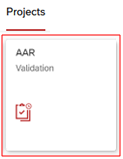
- Login: The academic report is accessible on the Sesame portal, Projects section, AAR Validation tile;
- Access is automatic for unit heads based on ACCRED rights. If the button does not appear, contact 1234@epfl.ch ;
- Delegation of Rights: unit heads can delegate access to other collaborators via accred.epfl.ch, using the authorization: "AAR – see academic achievement reports" ;
- Multi-Unit Navigation: if you manage multiple units, use the drop-down menu in the top left to switch between units.
Infoscience scope: publications and patents
The data primarily concerns EPFL laboratories, chairs, and research groups.
Publications Section
The Publications section of the AAR lists all academic outputs (articles, conference contributions, book chapters, working papers, preprints, reports, datasets, etc.) linked to your unit and available in Infoscience for the reporting year.
The complete list of document types accepted in Infoscience is available here.
Patents Section
The Patents section of the AAR displays patents linked to your unit and indexed in Infoscience. Only published patents are included (generally ≈ 18 months after the filing). A patent may have multiple international filings: the first dated filing is taken into consideration.
Inclusion Criteria for the Academic Report
To be included in the AAR, a publication or patent must meet the following conditions:
- It must be present/indexed in Infoscience ;
- Attributed to an EPFL unit of type laboratory, chair, or research group. Field: "EPFL units" ;
- Recognized EPFL affiliation: at least one author (or inventor, as applicable) must be affiliated with EPFL. The "Written at" field must indicate EPFL. If this field does not indicate EPFL, the publication is considered non-EPFL in this context and will not be included in the AAR ;
- Year consistent with the AAR: the publication date must correspond to the report year.
Display of Information in the Academic Report
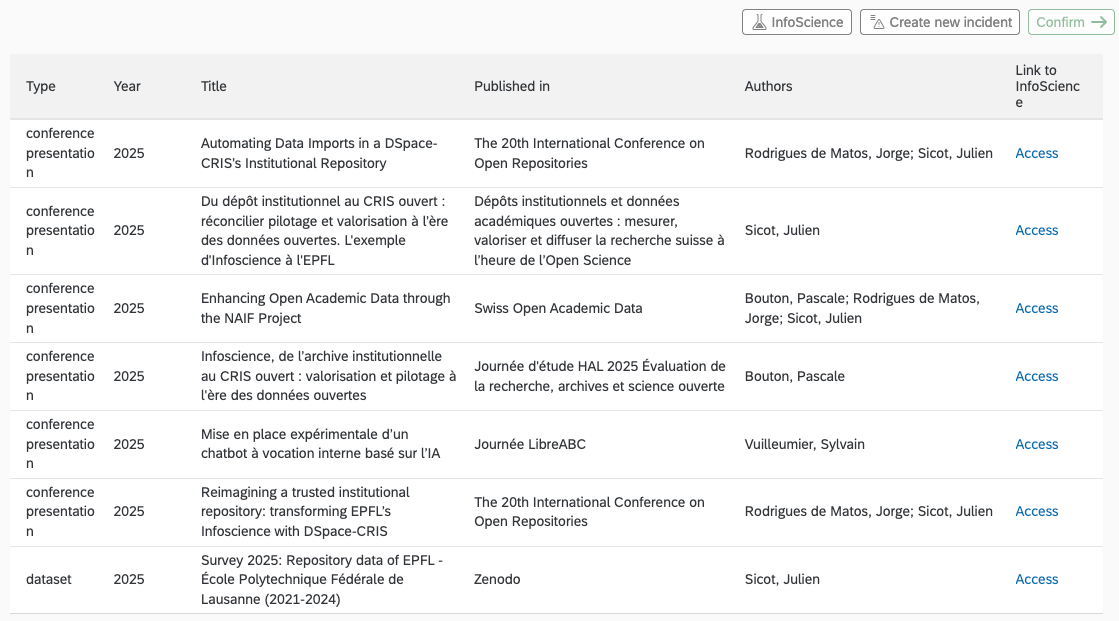
The Publications section presents the following information for each entry:
- Type: publication type according to the classification used in Infoscience;
- Year: publication year used for the academic report;
- Title: title of the publication;
- Published in: publication source, which varies depending on the document type. This may be the journal title, the title of the book or proceedings, the name of the conference, or the publisher / source platform;
- Author: authors affiliated with EPFL and associated with your unit during the relevant year. Only the first 4 authors meeting both the EPFL affiliation and unit membership criteria are displayed;
- Link to Infoscience: link to the full record in the Infoscience platform. This link can be used to verify the information at the source and, if necessary, request a correction.
Checks to be Performed During the Campaign
The objective is to validate the 10 thematic sections of your academic report: Teaching, Individual projects follow-up, PhD students, Funded research projects, Funded equipments, Publications, Patents, Start-ups, Institutional roles, and Awards. The academic data for each section must be validated using the "Confirm" button on the right of each section:

Once all 10 sections are validated, a confirmation email is sent to the last validator.
Help Tool: use the "Export Excel" button at the top of the interface to facilitate offline data verification.
Main Points to Check Concerning Your Publications and Patents in Infoscience:
- The list covers all expected publications for the year;
- Publications are correctly attributed to your unit;
- The "Written at" field is consistent (EPFL) for expected publications;
- The year (formal date / online date) is consistent with the AAR year;
- Absence of items clearly outside the scope (e.g., publications from another unit or attributed to an incorrect author not affiliated with your unit);
- Absence of obvious duplicates.
Modification Rights and Roles in Infoscience
Since Infoscience is the trusted source for your AAR, modifications must be made directly there, if you wish to change the content of the Publications and Patents sections of your AAR.
Here is how the modification rights system works in Infoscience:
| Role | Request a Correction (metadata, DOI, authors, etc.) | Modify the unit to which the publication is attributed |
|---|---|---|
| Unit Head | ✓ | if: record is already attributed to the unit OR at least one author or inventor has a main active affiliation with the unit |
| Unit Delegate (right assigned by the head from the unit page in Infoscience) | ✓ | same conditions as Unit Head |
| Author (record for which they are an author) | ✓ | — |
| Submitter (record they submitted) | ✓ | — |
Frequently Asked Questions
How the AAR works with Infoscience
Q1 — Which AAR sections are fed by Infoscience and which are not?
In practice, Publications and Patents come from Infoscience (bibliographic and attribution data). The rest depends on other EPFL sources (HR, IS-ACADEMIA, GrantsDB, etc.) and is not managed by Infoscience.
Q2 — Where do the publications and patents listed in the academic report come from?
Infoscience is the single source of truth for the "Publications" and "Patents" data used in the Annual Academic Report (AAR). Therefore, any correction or update must be performed directly in Infoscience before being reflected in the AAR.
To be included in the AAR, publications and patents must:
- be indexed in Infoscience;
- be attributed to an EPFL unit of type laboratory, chair, or research group;
- have a recognized EPFL affiliation (the "Written at" field indicates EPFL);
- have a publication year consistent with the report year.
Modifications made and validated in Infoscience are generally visible in the AAR on Day+1.
Q3 — What is the scope of the publications and patents considered for the AAR?
The Publications section of the AAR includes all scientific outputs linked to your unit and present in Infoscience for the year concerned, notably: journal articles, conference communications and papers, book chapters, working papers and preprints, reports, etc. The document types considered correspond to the typology defined in Infoscience. Doctoral theses defended at EPFL are also included.
The Patents section of the AAR includes patents linked to your unit and indexed in Infoscience. Only published patents are considered (generally about 18 months after the filing); in the case of multiple international filings, the first dated filing is retained.
Q4 — Are EPFL doctoral theses included in the AAR, and according to what rules?
Yes. Doctoral theses defended at EPFL referenced in Infoscience are included in the Annual Academic Report (AAR).
Q5 — How is data transmitted from Infoscience to the AAR?
Infoscience is fed by a combination of submissions made by researchers, professors, and EPFL units, and automated collection and enrichment processes, carried out daily from reference bibliographic sources (Web of Science, Scopus, OpenAlex, Crossref and Zenodo) and the European Patent Office (Espacenet) for patents, based on the presence of the EPFL affiliation.
All data undergoes quality control and curation, ensured by the Infoscience team (and TTO for patents), including duplicate management, metadata consistency, reconciliation of EPFL authors, and attribution to units. These processes guarantee reliable and consistent information, particularly for the Annual Academic Report (AAR).
Understanding how publications and patents are attributed to your unit
Q6 — What exactly does the "Written at" field mean?
The "Written at" field indicates whether the research output was produced at EPFL, based on the recognized institutional affiliation of the author(s) at the time of publication.
When it indicates EPFL, it means that the publication was carried out by at least one author affiliated with EPFL at that time and that it is part of the institutional EPFL bibliography.
Within the framework of the Annual Academic Report (AAR), only publications for which the Written at field indicates EPFL are taken into account.
Q7 — Why does "Written at" not indicate EPFL even though the author is affiliated?
Several situations can explain this:
- the publication was produced before the author arrived at EPFL;
- the EPFL affiliation is not explicitly or correctly indicated in the publication (non-standardized affiliation, ambiguous mention by the publisher);
- the metadata from external sources does not clearly identify the EPFL affiliation at the time of publication.
If the EPFL affiliation is indeed mentioned in the publication, a correction request can be made so that the "Written at" field is adjusted.
Q8 — How does the process of attributing publications or patents to EPFL units work?
A publication or a patent is automatically associated with a unit if at least one of its authors was affiliated with it at the time of publication, based on EPFL accreditation data (institutional People and Accred).
Unit heads, or the individuals to whom this responsibility has been delegated (notably administrative assistants), can check and adjust the attributions of publications linked to their unit.
To modify an attribution to your unit in Infoscience, follow the procedure Add or Reject the Attribution of a Unit to a Publication:
- Log in to Infoscience and open a publication linked to your unit or for which a member of your unit is an author.
- Click on the "…" button, then select "Edit Unit/Lab affiliations".
- Proceed with the necessary adjustments:
- delete the attribution to your unit by clicking on the trash icon;
- add another EPFL unit in case of collaboration.
To submit a publication not yet present on Infoscience: Submit a Publication
Modifications made and validated in Infoscience are generally visible in the AAR on Day+1.
Q9 — Why is a publication linked to a parent unit (faculty, institute) instead of my unit (laboratory, group)?
Several situations can explain why a publication is linked to a parent unit rather than a child unit (laboratory, group):
- The EPFL author's affiliation was not precise enough in the publication or in the available metadata (only the faculty or institute is identifiable);
- The institutional repositories used for attribution did not allow for automatic resolution of the affiliation to the finest level;
- The publication was automatically imported with a partial affiliation, linked by default to the parent unit.
If the publication genuinely concerns your laboratory or group, the unit heads or delegated individuals can request or perform an attribution adjustment in Infoscience, to link the publication to the appropriate level 4 unit (Request a Correction or Add or Reject an Attribution).
Once corrected in Infoscience, the attribution will be reflected in the Annual Academic Report (AAR) after update (generally on Day+1).
Q10 — What to do if a publication or patent is not yet linked to my unit?
If you have the necessary rights (unit head or delegated individual) and at least one of the listed authors or inventors is an active member of your unit, you can directly add the attribution of your unit in Infoscience using the "Edit Unit/Lab affiliations" feature.
Procedure:
- Open the Infoscience record for the publication or patent concerned;
- Click on the "…" button in the top right;
- Select "Edit Unit/Lab affiliations";
- Adjust the attribution as appropriate:
- remove your unit if the publication or patent does not concern it;
- add another EPFL unit in case of genuine collaboration.
- Save the modifications.
For more details, see: Add or Reject an Attribution
Otherwise (insufficient rights or a situation requiring validation), you can make a correction request or contact the Infoscience team via infoscience@epfl.ch or via an AAR incident.
Q11 — Why is a publication attributed with a Non-EPFL unit?
If a publication is associated with a Non-EPFL unit, it generally means that it is outside the EPFL scope, i.e., it was not produced within the framework of EPFL.
To correct this type of case, refer to the question: What to do to correct a publication associated with a Non-EPFL unit?
Checking and reporting problems in your AAR
Q12 — How to check the list of publications attributed to my unit that will be transmitted in the AAR?
The list of publications considered for the Annual Academic Report (AAR) corresponds to the publications linked to your unit in Infoscience.
Infoscience offers dedicated pages for EPFL units, which allow you to consult all the outputs attributed to them.
To access it, use the menu Explore → EPFL Units, then search for your unit using its acronym.
Once on your unit's page:
- Open the Scholarly Works tab, which lists all outputs currently linked to the unit;
- Use the search criteria to filter publications according to the academic report rules, for example:
dateIssued.year:2025 AND epfl.writtenAt:(EPFL)
- To display only patents, you can add the criterion: entityType:(patent)
entityType:(patent) AND dateIssued.year:2025 AND epfl.writtenAt:(EPFL)
Modifications made and validated in Infoscience are generally visible in the AAR on Day+1.
Q13 — After a correction request, when will the modification be visible in the AAR?
Correction request is analyzed and validated by the Infoscience team, which generally takes 24 to 48 hours, depending on the nature and complexity of the modification.
Once the correction is applied in Infoscience, the data is automatically reflected in the AAR during the next refresh, generally on Day+1.
Q14 — How to remove a publication incorrectly linked to my unit?
It is not possible to delete a publication from Infoscience. In accordance with the Infoscience deposit license, accepted records cannot be deleted.
The Infoscience team can, however, restrict or remove access to a work exceptionally, particularly in cases of:
- copyright infringement;
- violation of EPFL scientific integrity guidelines;
- violation of confidentiality obligations;
- official withdrawal by the publisher.
On the other hand, the link to a unit can be corrected.
If a publication is incorrectly attributed to your unit:
- You have unit management rights (head or delegate): you can remove the attribution via the option "Edit Unit/Lab affiliations" in the Infoscience record;
- You do not have the necessary rights or the situation is complex: create an incident via the section concerned in the AAR (Create a new incident) or make a correction request in Infoscience, so that an adjustment is performed at the source.
Any modification validated in Infoscience will be reflected in the AAR during the next refresh (generally Day+1).
Q15 — How to report a problem or anomaly in the AAR?
Each section of the AAR portal has a "Create a new incident" button.
Use the button for the section concerned (Publications or Patents) so that your request is redirected to the correct contact person.
The AAR is read-only. All corrections are made at the source level (Infoscience for publications/patents), and will then be visible after the AAR refresh (often Day+1).
Correcting the affiliation or metadata of a publication
Q16 — What to do if a publication or patent in the AAR should not be linked to my unit?
If you have the necessary rights (unit head or delegated individual), you can directly delete the attribution of your unit in Infoscience:
- Open the Infoscience record for the publication or patent concerned.
- Click on the "…" button in the top right.
- Select "Edit Unit/Lab affiliations".
- Remove your unit if the publication or patent does not concern it.
- Save the modifications.
Otherwise, you can create an AAR incident or contact infoscience@epfl.ch, briefly explaining why the attribution is incorrect.
See the procedures: Request a Correction or Add or Reject an Attribution
Q17 — How to correct the metadata of a publication or patent in the AAR (e.g., title, author, abstract, date)?
The AAR is read-only, and all correction requests concerning publications and patents must be made at the source in Infoscience. From the record concerned:
- use the "…" button then "Request a correction" to correct or complete metadata (title, authors, affiliation, DOI, etc.) or files;
- use the "…" button then "Create new version" only in case of an editorial version change (preprint → published version).
Corrections are examined by the Infoscience team before dissemination.
See: Request a Correction or Create a New Version
Modifications made and validated in Infoscience are generally visible in the AAR on Day+1.
Q18 — Is it possible to correct an attribution directly in Infoscience?
Yes, if you have the necessary rights (unit head or delegated person), you can correct an attribution directly in Infoscience, without going through support (Modification Rights and Roles in Infoscience).
This possibility only applies to:
- publications or patents already attributed to your unit;
- or records for which at least one of the listed authors or inventors is a member of your unit.
Procedure:
- Open the Infoscience record for the publication or patent concerned.
- Click on the "…" button in the top right.
- Select "Edit Unit/Lab affiliations".
- Adjust the attribution as appropriate:
- remove your unit if the publication or patent does not concern it;
- add another EPFL unit in case of genuine collaboration.
- Save the modifications.
More details in the help section Add or Reject the Assignment of a Unit to a Publication.
Changes are taken into account in Infoscience and will be reflected in the AAR after update (generally on Day+1).
In other cases (insufficient rights, complex situation, or requiring validation), you should submit a correction request. If this is not possible, you can send your request by ticket to infoscience@epfl.ch or create a new AAR incident so that the Infoscience team analyzes and applies the modification.
Q19 — What to do if a publication appears as a duplicate?
Report the duplicate via a correction request or contact the Infoscience team using an AAR incident or via infoscience@epfl.ch, indicating both concerned Infoscience records. The Infoscience team is responsible for merging them.
Q20 — What to do to correct a publication associated with a Non-EPFL unit?
If a publication is associated with a Non-EPFL unit, it generally means that it is outside the EPFL scope for the Annual Academic Report (AAR).
Here is how to proceed, depending on the case:
- if the publication genuinely does not concern EPFL (no author affiliated with EPFL at the time of publication), no action is required. It will not be taken into account in the AAR.
- if the publication does concern EPFL, but is incorrectly linked to a Non-EPFL unit, you can:
- add the correct EPFL unit (if you have unit management rights);
- make a correction request in Infoscience by justifying the EPFL affiliation (if your rights allow it);
- or contact the Infoscience team via an AAR incident or by infoscience@epfl.ch.
After correction and validation by the Infoscience team, the attribution will be updated in Infoscience and reflected in the AAR during the next refresh (generally Day+1).
Q21 — What to do if the online publication date is different from the formal publication date?
For the Annual Academic Report (AAR), the year taken into account is the publication date indicated in the corresponding Infoscience record. If this date does not correspond to the formal publication date, you can request a correction in Infoscience by providing factual elements (publisher page, DOI, official dates).
After validation by the Infoscience team, the retained year will be updated in Infoscience and reflected in the AAR during the next refresh (generally Day+1).
Some publications or patents do not appear in your AAR
Q22 — Why is my publication neither in Infoscience nor in the AAR?
Several reasons can explain this:
- the publication has not yet been submitted or imported into Infoscience;
- the metadata from external sources does not clearly identify an EPFL author or an EPFL affiliation (non-normalized affiliation, ambiguity on author names, absence of ORCID, etc.).
To limit these situations, it is strongly recommended:
- to create and use an ORCID and systematically transmit it to the publisher when submitting an article;
- to indicate a standardized EPFL affiliation, associating the EPFL ROR identifier with it, in addition to the textual mention of the affiliation. Example: École Polytechnique Fédérale de Lausanne, Lausanne, Switzerland. https://ror.org/02s376052
These best practices facilitate the automatic identification of EPFL publications and their rapid integration into Infoscience and, consequently, into the Annual Academic Report (AAR).
To submit a publication not yet present on Infoscience: Submit a Publication
Q23 — Why does my publication not appear in the AAR even though it is present in Infoscience?
If a publication is present in Infoscience but absent from the Annual Academic Report (AAR), it generally means that it does not meet the AAR inclusion criteria, including:
- the attribution to the unit is missing or incorrect;
- the "Written at" field does not indicate EPFL, which prevents its consideration as EPFL production in the AAR;
- the publication year does not correspond to the report year.
In this case, it is recommended to check the record in Infoscience (unit attribution, affiliation, year, etc.).
If an anomaly is noted, you can request a correction in Infoscience or report the problem via an AAR incident, so that a correction is performed at the source.
Q24 — Why are some expected patents not appearing in the AAR?
Several reasons can explain the absence of a patent in the AAR:
- the patent is not yet published: only published patents are taken into account, generally about 18 months after filing;
- the patent is not (yet) indexed in Infoscience;
- patents automatically imported from Espacenet are those whose applicant (owner) is EPFL; a patent for which an inventor is affiliated with EPFL, but whose applicant is another institution (for example, a partner university or a company), is not automatically imported into Infoscience;
- the patent exists in Infoscience but the attribution to the EPFL unit is missing or incorrect;
- the inventor's EPFL affiliation is not recognized at the time of import;
- the year retained for the patent does not correspond to the academic report year.
If your patent is indeed published and does not yet appear in Infoscience, please contact infoscience@epfl.ch or report a problem via an AAR incident.
Q25 — How to add a missing publication?
After checking that the publication does not already exist in Infoscience (search by title, DOI, or author), you can add it directly via the Infoscience submission form, by following the dedicated procedure Submit a Publication.
Several assistance tools are available to facilitate the operation, notably:
- import from a DOI;
- import from an external bibliographic database.
If the volume of missing publications is significant (for example, as part of a catch-up or an earlier period), it is recommended to contact Infoscience support (infoscience@epfl.ch). The team will analyze the situation and evaluate the possibilities for retrospective import or grouped processing.
Roles and modification rights
Q26 — Who has the right to request corrections in Infoscience?
Submitters of a record and authors of a publication can:
Unit heads or delegated individuals (e.g., administrative assistants) can:
- request corrections
- modify the attributions of their unit.
The detail of the rights is available here: Modification Rights and Roles in Infoscience.
Corrections are examined and validated by the Infoscience team (and by the TTO for patents).
Q27 — How to obtain authorization to associate a unit with a publication (or request a modification)?
The attribution is based on the EPFL affiliation of the authors at the time of publication. Unit heads (or delegated person) can add or remove a unit directly from the Infoscience record.
In case of doubt or a complex situation, contact infoscience@epfl.ch.