File naming and formats best practices
It is essential for file submitters to prioritize durable formats to avoid loss of readability. They are also encouraged to carefully name and version their files, as this affects their identification and reuse.
File formats
Prioritize file formats that:
- Are commonly used and high quality;
- Can be read by multiple software applications;
- Are not proprietary (free and open-source software);
- Are open and well-documented;
- Are uncompressed and unencrypted.
| File type | High level of confidence | Medium level of confidence | Low level of confidence |
|---|---|---|---|
| Text document | PDF/A-1 – ISO 19005-1 (.pdf) Plain Text UTF-8 (.txt) XML with included schema (.xml) |
HTML (.htm, .html) LaTeX (.latex, .tex, .ltx) Word 2007+ (.docx) PDF with embedded fonts (.pdf) Rich Text Format 1.x (.rtf) SGML (.sgml) |
Word 2003 or older (.doc) PDF encrypted (.pdf) WordPerfect (.wpd) |
| Spreadsheet | CSV / TSV (.csv, .tsv, .txt) SIARD (.siard) |
Excel 2007+ (.xlsx) OpenDocument (.ods) XML (.xml) |
Excel 2003 or older (.xls) |
| Presentation | PDF/A-1 (.pdf) | PowerPoint 2007+ (.ppt, .pptx) OpenDocument Presentation (.odp) |
PDF generic (.pdf) PowerPoint (.ppt) Keynote (.key) |
| Image | PNG 24bit (.png) TIFF uncompressed (.tif, .tiff) |
DNG (.dng) GIF (.gif) JPEG2000 lossless (.jp2) JPEG/JFIF (.jpg) PNG 8bit (.png) TIFF compressed (.tif, .tiff) |
JPEG2000 lossy (.jp2) Photoshop (.psd) RAW formats (.raw, etc) |
| Audio | AIFF uncompressed (.aif, .aiff) FLAC (.flac) WAV uncompressed (.wav) |
AAC (.mp4) ALAC (.m4a) MP3 (.mp3) SUN audio uncompressed (.au, .snd) |
AIFC compressed (.aifc) RealAudio (.ra, .rm) WAV compressed (.wav) WMA (.wma) |
| Video | AVI uncompressed (.avi) QuickTime uncompressed (.mov) |
MXF uncompressed (.mxf) Motion JPEG2000 (.jp2) MPEG-1, MPEG-2 (.mp1, .mp2) MPEG-4 H.264 (.mp4) |
RealVideo (.rv, .rm) QuickTime compressed (.mov) WMV (.wmv) |
| CAD | PDF/E – ISO 24517-1:2008 (.pdf) | AutoCAD (.dwg) DXF (.dxf) |
N/A |
| Archives | ZIP (.zip) TAR (.tar) GZIP (.gz) RAR (.rar) |
N/A | N/A |
| Data | JSON (.json) XML (.xml) SQL (.sql) |
N/A | N/A |
| Source code | Code files (.py, .java, .cpp, .html, .css, .js, etc.) | N/A | N/A |
File naming
Please follow these rules for naming the files you upload to Infoscience:
- Choose a meaningful name for your file.
- Avoid overly long names (max. 32 characters, including the extension).
- Do not use accented characters or special characters (such as space, #, @, &, €, +, etc.).
- Use an underscore
_between terms if needed. - Avoid conjunctions (and, on, of, about, etc.) and unnecessary articles (the, a, an, etc.).
- Avoid abbreviations unless they are well-known at EPFL.
- Do not include the author's name in the title. This information is already present in the metadata of the record.
Examples:
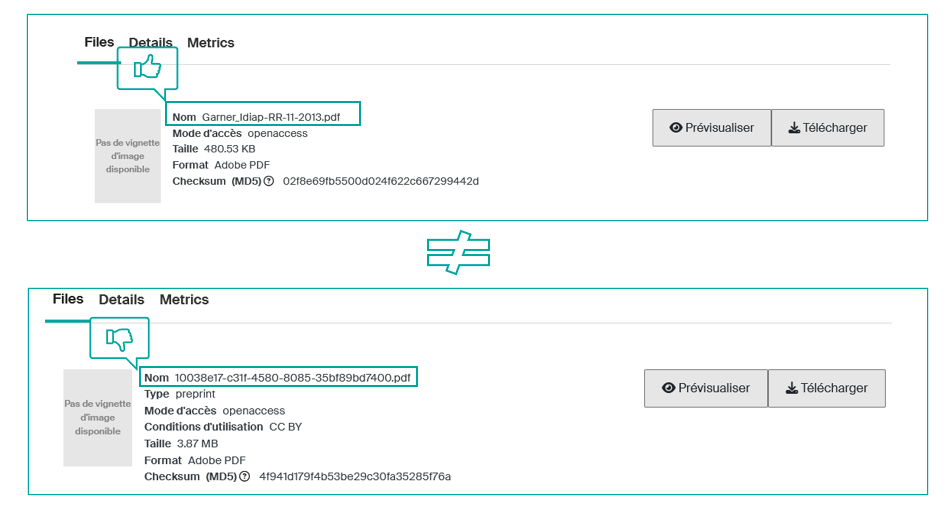
Files versions
Infoscience allows you to upload multiple editorial versions of the same document to a single record using the "create a new version" option (see Submit a publication).
The version indicates the status of the document based on its progress in the publication cycle.
| Version | Definition |
|---|---|
| Preprint or submitted version | The version submitted before peer review, not yet accepted. |
| Postprint or accepted version | The version accepted after peer review but before publisher formatting. |
| Published version | The final version accepted by a journal, peer-reviewed, corrected by the author, and formatted by the journal's editor for publication. |
Tip
If the publisher's policy allows, upload the published version, with any embargo that may be imposed. It is always permissible to upload preprints and postprints.