Search and consult
To find a publication, an author, a laboratory or a specific subject, browse through Infoscience!
Info
EPFL authentication is not required.

Simple search
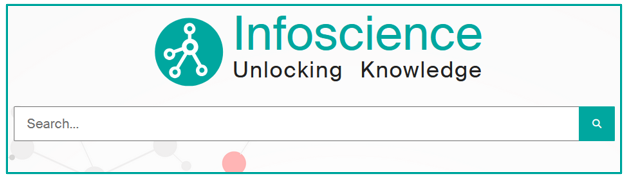
The search bar on the homepage allows you to search for one or more keywords: name, title, subject, date… You will find publications and works corresponding to these criteria.
In the search bar, enter the desired terms, then click on Search.
Display results and use filters
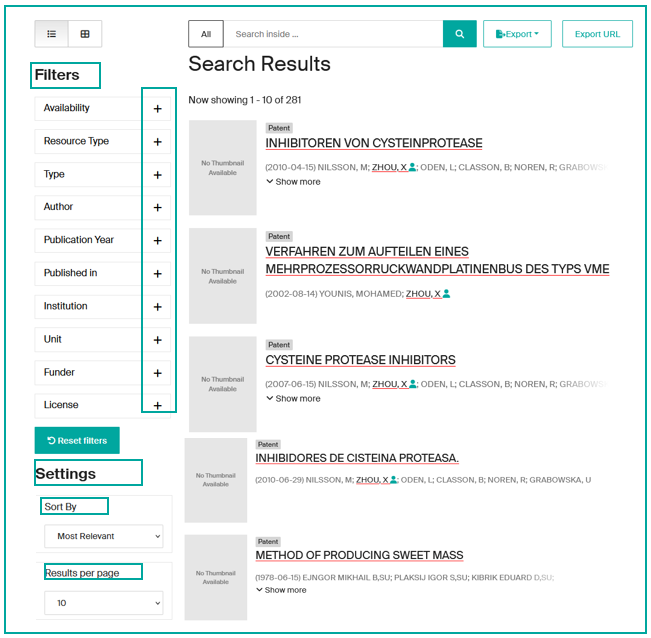
When the list of results is displayed, you can:
- Refine it by using the filters offered on the left (Document Type, Authors, Date, License, … .)
- Sort the list using the parameters offered at the bottom left (relevance, deposit date, …).
- Modify the number of results displayed, at bottom left.
Tip
Various tips can facilitate your search. Discover them by consulting the expert queries examples.
Navigation menus
Menus allow you to browse content from several entry points:
- Search:
- Schools & Colleges
- Research Centers & Platforms
- Education:
- Doctoral Schools (EPFL thesis)
- Sections (student works)
- Innovation (patents)
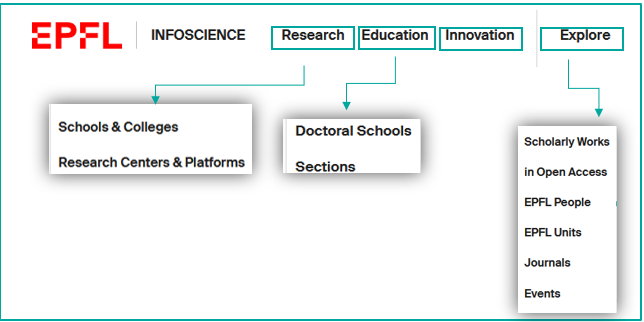
Explore: to browse Infoscience content through lists ordered by:
- Scholarly Works (advanced search)
- In Open Access
- EPFL People
- EPFL Units
- Journals
- Events
Advanced search (Explore menu)
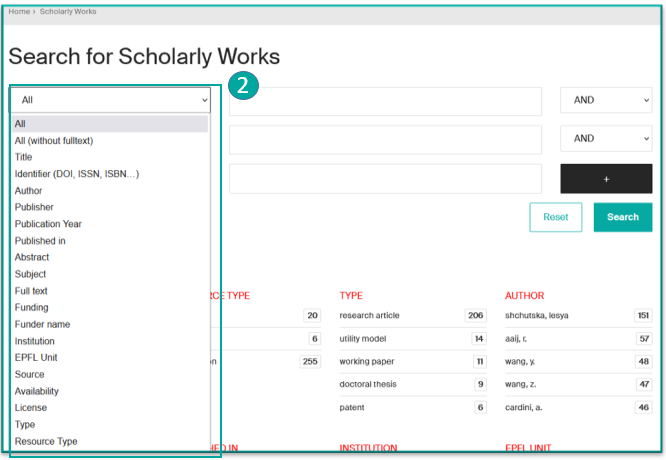
Explore menu (1) allows you to quickly target a search scope and combine multiple criteria (Title, Author, Document Type…) using boolean operators (AND, OR, NOT).
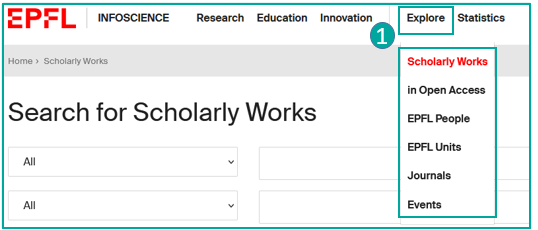
The available indexes for search are provided in the dropdown menu (2).
Consult a record
By default, records are presented in brief form. Clicking on the title takes you to the detailed record.
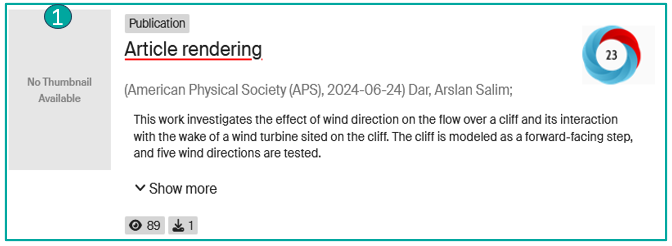
The brief record (1)
The brief record presents:
- The type of content (here "Publication")
- Access type (if available)
- The title
- The publisher (or container)
- The first authors (clickable to see their profile if available)
- The beginning of the abstract
- Statistical indicators of consultation and/or downloading (if the record has been consulted and/or the file downloaded)
- An Altmetric widget (if available) that measures and monitors the scope and impact of online academic research.
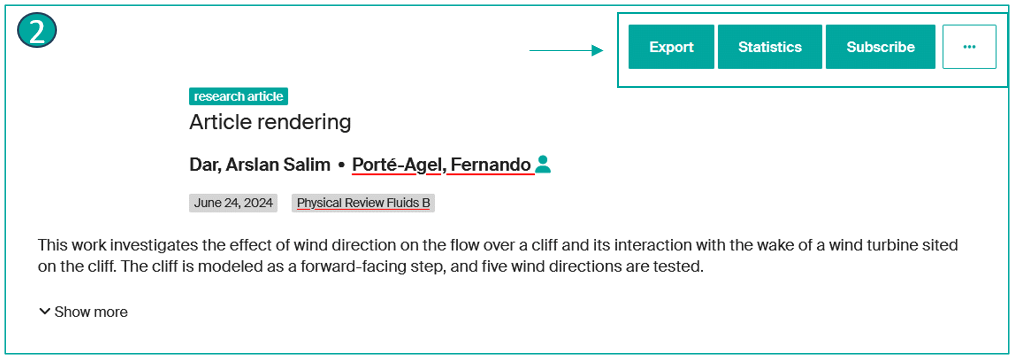
The detailed record (2)
The detailed record presents:
- Document type
- Deposit date
- Journal name
- an Export button for exporting information from the record in various formats (RIS, JSON, Cerif-XML, Datacite-XML, CSV and BibTeX)
- the Statistics button for accessing statistical details (Total visits, total visits per month, Top city views, File visits), with the option of exporting them to Excel or CSV.
- a Subscribe button (only visible to registered EPFL users): Allows you to trigger alerts about the record updates.
- a "…" button displays all the record's metadata (technical view).
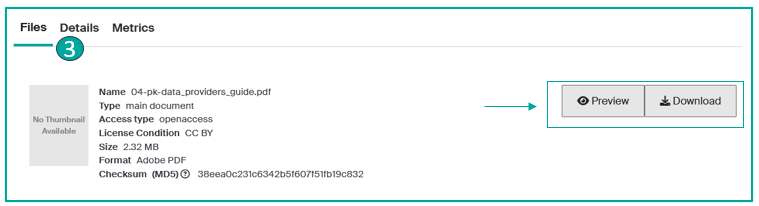
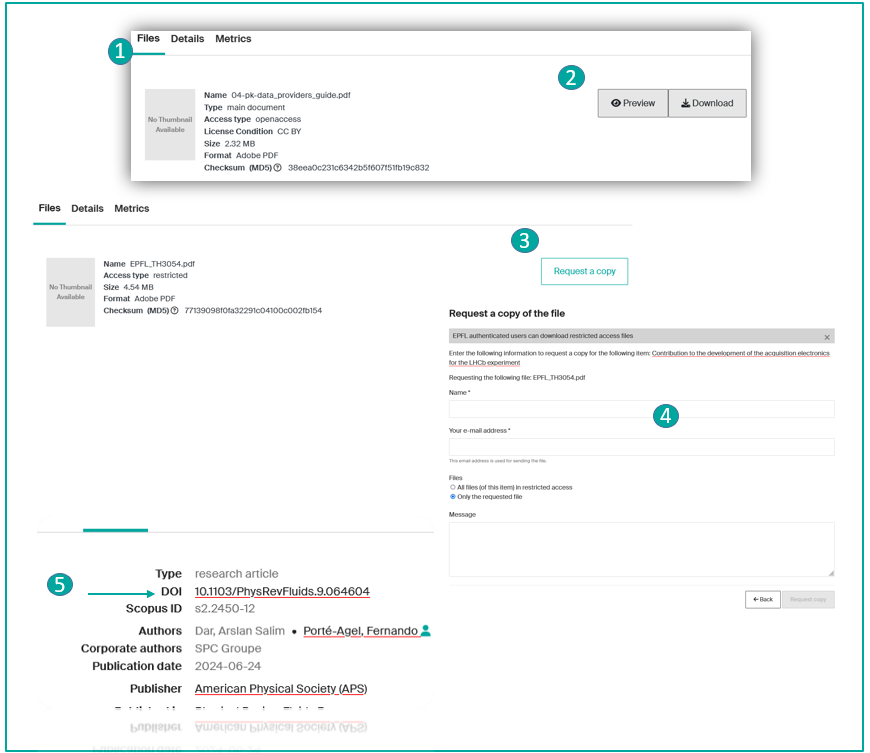
In the Files tab (3)
Information about the file(s):
- the file name
- the file version/type
- the access type
- file licence
- file size
- file format
- file checksum
- and if the file can be read or downloaded
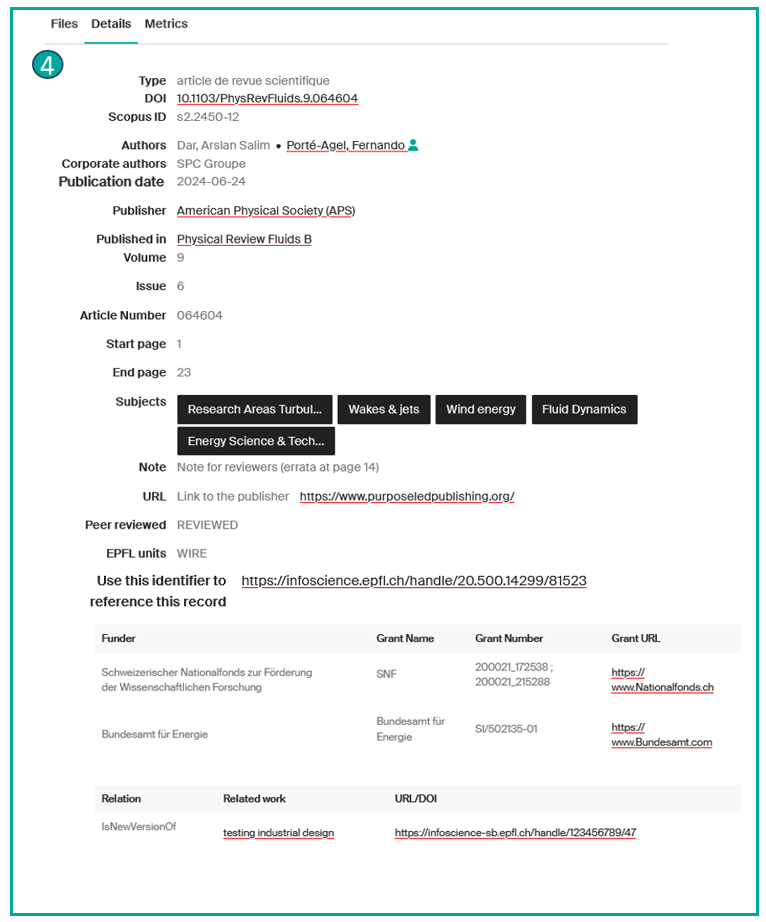
In the Details tab (4)
- Resource type
- DOI if present
- Scopus ID*
- The complete list of authors
- Corporate authors*
- Publication date
- Publisher
- Journal title
- Volume*
- Issue*
- Article Number*
- Start and End Page*
- Keywords
- Note*
- Additional Link*
- If Peer reviewed
- The unit corresponding to the publication
- the Handle (permanent and unique link to the record)
- An insert on Funder*
- Relation, if the record is linked to another record*
*If available in the record
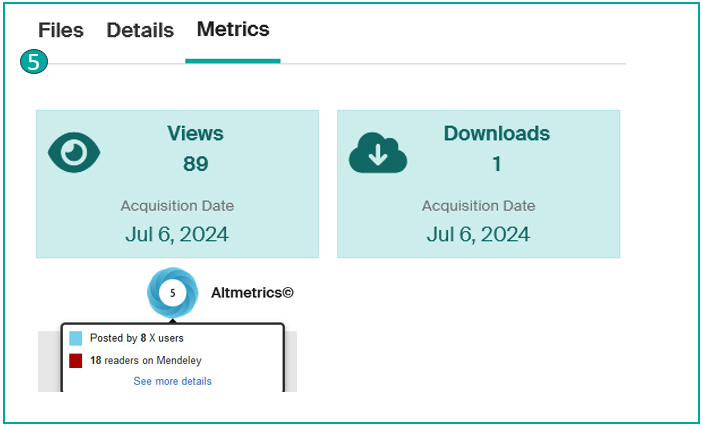
In the Metrics tab (5)
- The number of times the record has been consulted
- The number of downloads of the record
- An Altmetrics widget can be added to measure and monitor the reach and impact of online academic research.
View linked files (full text, request a copy, etc.)
When a record contains one or more files, you have different options:
-
If the file is Open Access, go to the "Files" tab (1), preview or download the desired file(s) (2). You have the option to download one or more files.
-
If the file is restricted access:
- For non-EPFL users, you can request a copy for your personal use. To do this, go to the "Files" tab, then click on "Request a copy" (3). Once the request form has been filled in (4), if the author agrees, you will receive an e-mail containing a temporary access link to the file(s).
- For EPFL users, restricted-access files are accessible after authentication with the Gaspar account via Microsoft Entra ID.
-
For documents under embargo, the file(s) become accessible after the release date indicated on the record details. However, you can still access the file(s) by requesting a copy.
Note
Infoscience records may not include an attached file. A link to the full text (e.g., DOI) (5) may allow you to access the file directly on the publisher's page.
Example of expert queries
To obtain more precise results, we strongly recommend that you build well-defined queries using the available indexes. Here are a few examples of queries to help you create your publication lists efficiently.
Search for all references for a given author
author:(smith, john)
Search for all references for a person with the role of author or scientific editor
author_editor:(smith, john)
Search for all references assigned to a unit
Example:
dc.description.sponsorship:LASUR
Limited to publications from the last three years
Filter by type of publication
To restrict the search to certain types of publication, for example 'research articles' and 'conference papers', use:
dc.description.sponsorship:LASUR AND (types:(research article) OR types:(conference paper))
Sorting results
By default, Infoscience sorts search results by relevance. However, if you prefer a different sorting mode, you can use the options on the left under the filters/facets. For example, to sort results by publication date in descending order, follow this link:
Warning
It's important to define the sorting you want for your list of publications as soon as you build the query.
By following these steps, you can easily create and customise a list of publications for your unit on WordPress.
For further assistance, please contact Infoscience support.
Search indexes
A full list of search indexes (fields usable in queries) is documented in the interactive data model map at epfllibrary.github.io/infoscience-map.
Identifiers
| Index | Description | Example |
|---|---|---|
search.resourceid |
Search by record UUID | search.resourceid:a1b2c3d4-e5f6-7890-abcd-ef1234567890 |
cris.legacyId |
Search by former Infoscience identifier | cris.legacyId:175201 |
itemidentifier |
Search by identifier: DOI, arXiv, WoS, Scopus… | itemidentifier:(*arXiv.2306.09281) |
doi |
Search by DOI only | doi:(10.1002/anie.202414612) |
orcid |
Search by ORCID identifier | orcid:0000-0001-2345-6789 |
Authors and people
| Index | Description | Example |
|---|---|---|
author |
Search by author name | author:(Martin, Sophie) or author:(Martin, S*) |
author_authority |
Search by author using profile UUID | author_authority:f9e8d7c6-b5a4-3210-fedc-ba9876543210 |
author_editor |
Search by author or scientific editor | author_editor:(Martin, Sophie) |
author_editor_authority |
Search by author or scientific editor using profile UUID | author_editor_authority:f9e8d7c6-b5a4-3210-fedc-ba9876543210 |
submitter_keyword |
Search by submitter | submitter_keyword:(*dupont*) |
Document types
| Index | Description | Example |
|---|---|---|
types |
Search by document type using the display value | types:(conference paper) |
types_authority |
Search by document type using the COAR authority identifier | types_authority:("article-coar-types:c_2df8fbb1") or types_authority:(*c_2df8fbb1) |
Dates
| Index | Description | Example |
|---|---|---|
dateIssued |
Search by publication date (format YYYY-MM-DD) | dateIssued:(2024-06-12) or dateIssued:(2024-06-*) |
dateIssued.year |
Search by publication year | dateIssued.year:(2009) |
Units and affiliations
| Index | Description | Example |
|---|---|---|
unitOrLab |
Search by unit or laboratory acronym | unitOrLab:("TRANSP-OR") |
organizationHierarchy |
Search by affiliation — includes full hierarchy: faculty > institute > lab | organizationHierarchy:("SPC") |
epfl.writtenAt |
Filter by publications produced at EPFL or not | epfl.writtenAt:EPFL or epfl.writtenAt:OTHER |
Titles, content and subjects
| Index | Description | Example |
|---|---|---|
title |
Search in title | title:(artificial intelligence) |
abstract |
Search in abstract | abstract:(artificial intelligence) |
subject |
Search by subject or author keyword | subject:(LLM) |
container |
Search by book, proceedings or journal title in which the paper appears | container:(*IEEE proceedings*) |
journal |
Search by journal title | journal:(Physical Review B) |
journal_authority |
Search by journal using its Infoscience UUID | journal_authority:c3d4e5f6-a7b8-9012-3456-789abcdef012 |
publisher |
Search by publisher | publisher:(*springer*) |
Access, version and rights
| Index | Description | Example |
|---|---|---|
oaire.version |
Filter by publication version | oaire.version(*c_970fb48d4fbd8a85) = Publisher versionoaire.version(*c_ab4af688f83e57aa) = Accepted Manuscriptoaire.version(*c_71e4c1898caa6e32) = Submitted version |
datacite.rights |
Filter by access type | datacite.rights:(openaccess) or datacite.rights:(restricted) or datacite.rights:(metadata only) |
epfl.peerreviewed |
Filter by peer-reviewed publications | epfl.peerreviewed:REVIEWED |
Funding
| Index | Description | Example |
|---|---|---|
fundername |
Search by funder | fundername:(SNSF) |
URL parameters
| Parameter | Description | Example |
|---|---|---|
query |
Main search parameter | &query=title:(artificial intelligence) |
configuration |
Scope the search to a specific configuration | &configuration=researchoutputs (publications, patents, products) |
scope |
Scope the search to a specific collection, person or unit | &scope=1a71fba2-2fc5-4c02-9447-f292e25ce6c1 |
f.{index} |
Additional filters on results | &f.unitOrLab=crpp,equals |
spc.rpp |
Number of results per page | &spc.rpp=10, &spc.rpp=60, &spc.rpp=100 |
spc.sf and spc.sd |
Sort field and sort direction | spc.sf=dc.date.issued&spc.sd=DESC (by date)spc.sf=metric.scopusCitation&spc.sd=DESC (by citations)spc.sf=score&spc.sd=DESC (by relevance) |
spc.page |
Pagination | &spc.page=1 |
Boolean operators and syntax
| Operator | Description | Example |
|---|---|---|
AND |
Combine multiple criteria (strict) | author:(bernard) AND dateIssued.year:[2008 TO 2010] |
OR |
Extend search with alternatives | (author:(bernard) OR author:(Martin)) |
NOT or - |
Exclude results | -types:(conference poster) |
" " (quotes) |
Exact phrase search | "Durand, Claire", "Leclerc, Marc" |
[X TO Y] |
Range search | dateIssued.year:[2020 TO 2024] |
* (wildcard) |
Partial match | author:(Martin, S*) |
Alerts
Would you like to be informed about new publications related to a laboratory, an author, a journal, a conference, a patent, or a unit in Infoscience?
Infoscience allows you to receive email alerts at your preferred frequency.
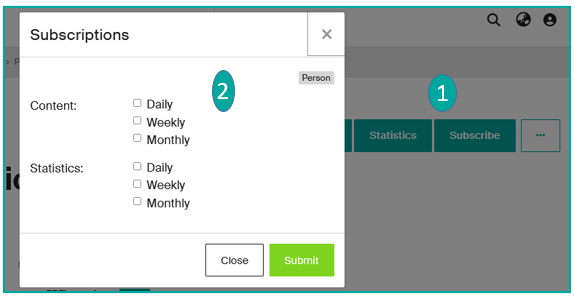
The Subscribe button (1) available on certain pages (publications, people, journals, events, units) lets you subscribe with a single click and select the content and frequency of the notifications (2).
Warning
Only logged-in users can activate this service.
Modify/Delete alerts
Would you like to modify or delete alerts you have subscribed to?
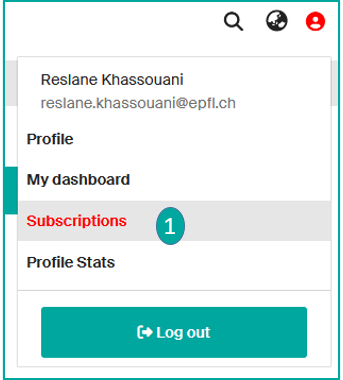
Go to your profile icon and click on Subscriptions (1).
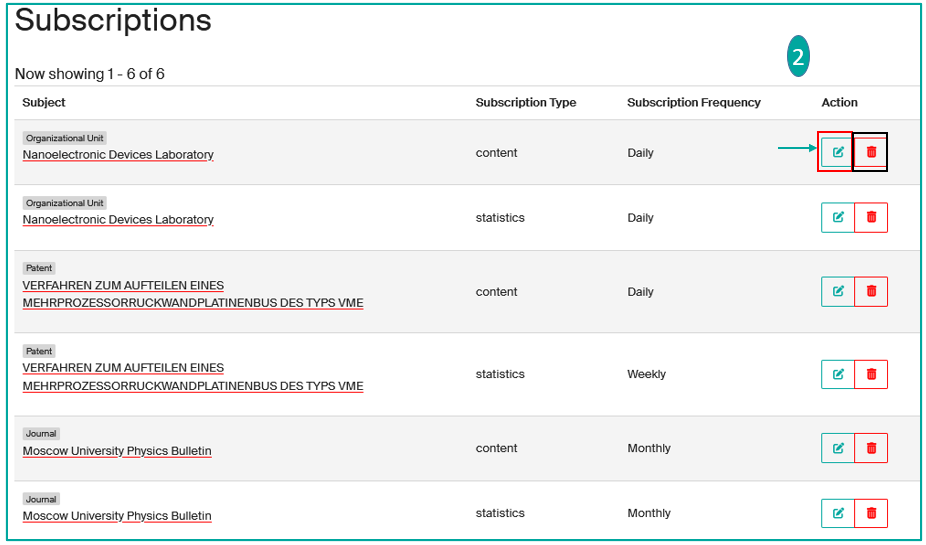
The page with all your subscriptions will appear, you can modify the frequency and content of the alerts or permanently delete them (2).
Statistics
Site statistics
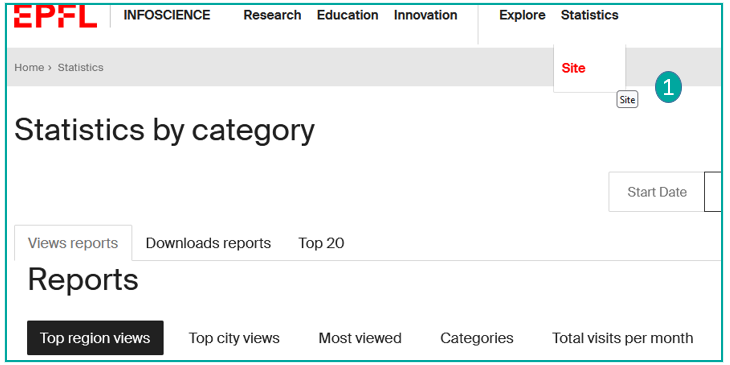
From the top banner, you have the option to view Statistics by clicking on "Site" (1).
You will find reports on views, downloads, and the Top 20 statistics for the entire Infoscience platform.
At the bottom page, you will find more details:
- Top views by region
- Top views by city
- Most viewed
- Categories
- Total views per month
You can export these reports to Excel and CSV.
Record statistics
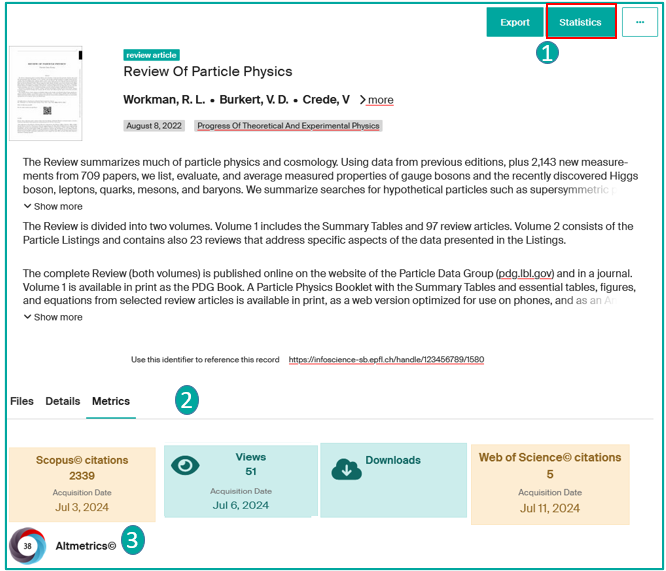
You can consult the statistics for each record by:
-
Clicking on "Statistics" button (1):
- Total views
- Total views per month
- Total views by city
- Views (files)
You can export these reports to Excel and CSV.
-
Clicking on the Statistics tab at the bottom of the record (2):
- number of times the record has been consulted
- number of downloads of the file
- see, via a tool called 'Metrics' relating to the publication: Number of Scopus and Web of Science citations, Altmetrics (3), link to the resource description in Google Scholar if present.
By clicking on these widgets (3), you can access the same details.
Profile and unit statistics
- Profil statistics: See Manage my Infoscience profile
- Unit statistics: See Manage my lab/unit page